Collaborative AI Workspaces

Your Personal AI Command Center. Your Team’s Shared Intelligence Hub.

Download NowContact Us
StationOne icon

StationOne Workspaces give everyone their own private AI environment and the power to create secure, governed team spaces where knowledge, workflows, and AI capabilities scale across your organization.

Challenge: AI Chaos Across Your Organization

Right now, your team’s AI work is scattered.

  • Individual employees using ChatGPT, Claude, and a dozen other tools—with zero visibility
  • Knowledge locked in personal accounts—neither shared nor reused
  • No control over vwhich models are used, what data is accessed, or how AI is deployed
  • IT and security teams completely blind to AI adoption and risk
  • Teams reinventing the wheel instead of building on each other’s work

The result? Productivity silos. Security risks. Compliance nightmares. And a massive lost opportunity to compound intelligence across your organization.

Solution: StationOne Workspaces

Two Workspace Types. Infinite Possibilities.

Personal Workspaces: Your Private AI Command Center

Your personal AI laboratory where you can build, experiment, and work—without worrying about exposing sensitive information or stepping on anyone else’s work.

What You Get

  • Private by default: Your work stays yours unless you choose to share.
  • Full model access: Choose from OpenAI, Anthropic, Google, and more (within your org’s permissions).
  • Your knowledge base: Upload files, create playbooks, build skills—all private to you.
  • Unlimited experimentation: Test prompts, build workflows, refine your AI capabilities.
  • Personal agents: Create AI teammates to help with your daily work.
  • Secure by design: Your data never leaves the StationOne platform or gets used for model training.

Team Workspaces: Shared Intelligence Hubs

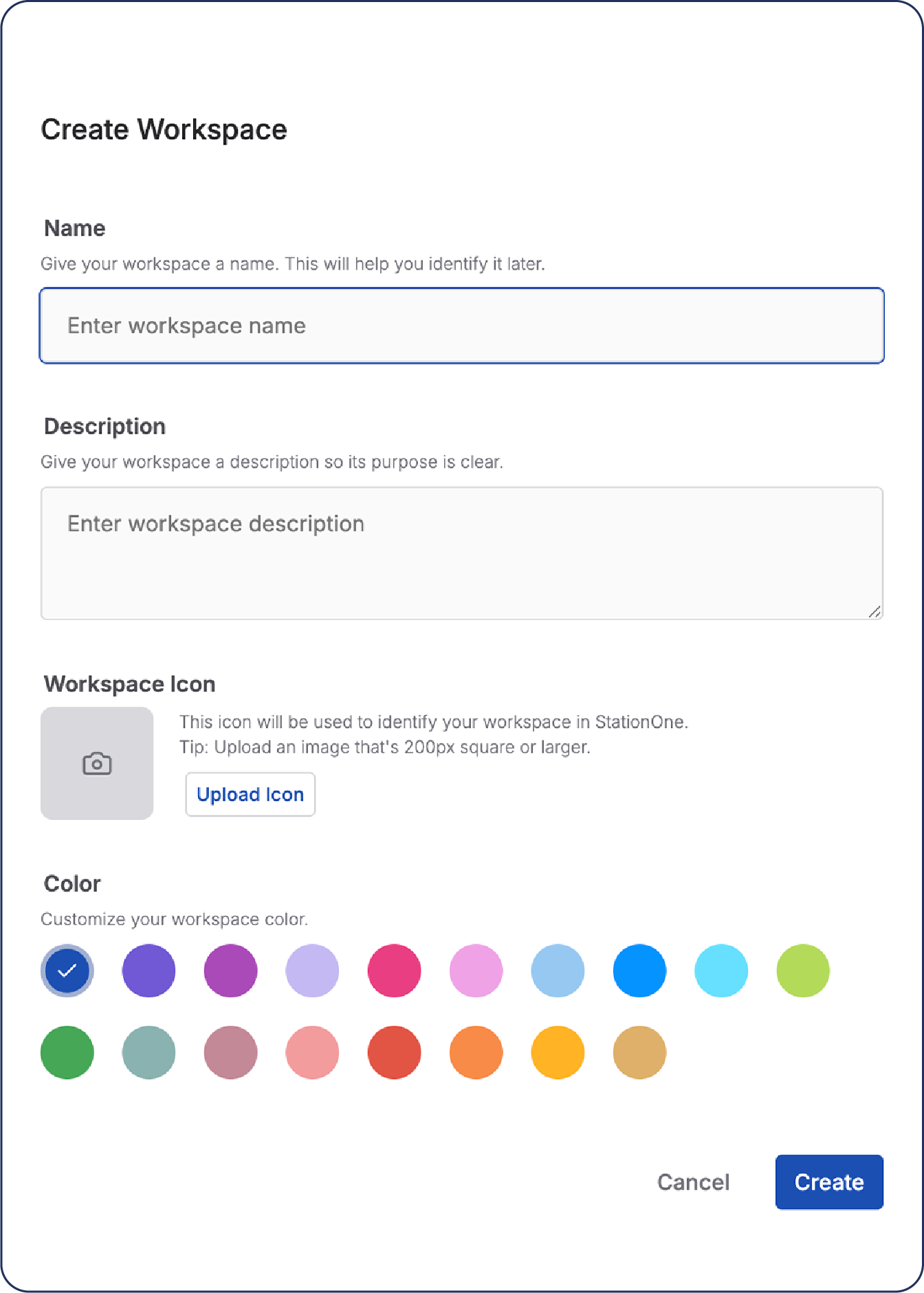
A shared operating system for AI across your team, where everyone has access to the same intelligence, tools, and workflows, but everything is governed and secure. Create workspaces for teams, departments, projects, or your entire organization. This is where knowledge compounds, workflows standardize, and AI capabilities scale.
What You Get

  • Shared knowledge bases: Centralize documents, case studies, best practices, and institutional knowledge.
  • Standardized skills & pre-prompts: Build reusable AI capabilities that everyone can use.
  • Collaborative playbooks: Devise multistep workflows for complex projects that teams execute together.
  • Pre-configured connectors: Integrate tools (e.g., Slack, Asana, Google Drive) at the workspace level.
  • Governed model access: Control which AI models can be used in the workspace.
  • Role-based permissions: Define who can view, edit, create, or share workspace resources.
  • Usage visibility: Admins see how AI is used—no more shadow AI.
  • Compliance controls: Set guardrails, audit logs, data residency rules.

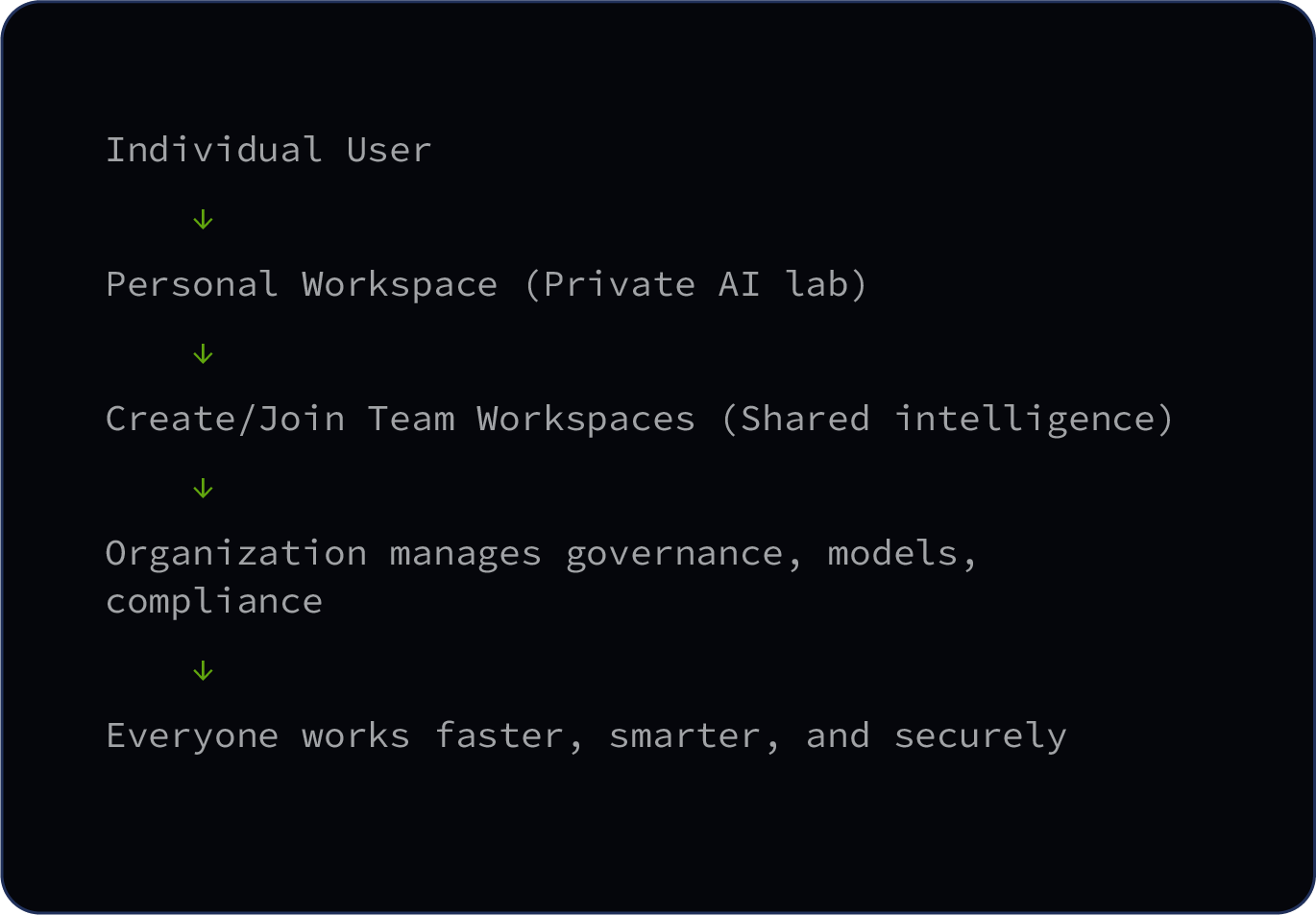
How It Works: From Personal to Organizational Scale

Start Personal. Scale to Teams. Govern Organization-Wide.

StationOne icon

Use Cases: Workspaces for Every Scenario

Personal Productivity Workspace

Who: Individual contributors

What: Private space for daily AI work—writing, research, data analysis, brainstorming

Why: Experiment freely without worrying about sharing unfinished work

Examples

  • A marketing manager uses their personal workspace to draft campaign briefs, analyze competitor research, and build presentation decks.
  • When a workflow is proven, they package it as a skill or playbook and share it to the Marketing Team Workspace.
Department Team Workspace

Who: Marketing, Sales, Product, Operations teams

What: Shared space utilizing standardized Skills, Playbooks, and Knowledge Bases

Why: Stop reinventing the wheel—everyone uses the same proven workflows

For example, the Marketing Team Workspace includes:

  • Pre-prompt skills: Brand Voice Checker, Campaign Brief Generator, Competitive Analysis
  • Shared knowledge: Brand guidelines, past campaign data, customer research
  • Playbooks: Q2 Product Launch, Event Activation Plan
  • Connectors: Asana, Google Drive, Slack
  • Model governance: Team can use GPT-4 and Claude but not unapproved models
Cross-Functional Project Workspace

Who: Mixed teams working on a specific initiative (e.g., product launch, M&A, rebranding)

What: Time-bound workspace with all resources for a given project

Why: Stop reinventing the wheel—everyone uses the same proven workflows

For example, the Q2 Product Launch Workspace includes:

  • Project playbook with phases, deliverables, and timelines
  • Launch documents, creative assets, and research
  • Preconfigured agents for competitive monitoring, social listening, performance tracking
  • Role-based access: core team (full access), executives (view-only), external partners (limited)
Client/Partner Collaboration Workspace

Who: Agency teams working with clients, consultants with customers

What: Shared workspace where external collaborators can participate

Why: Secure collaboration without giving access to your entire organization

For example, the Agency + Brand Client Workspace includes:

  • Client’s brand assets, campaign briefs, and performance data
  • Collaborative playbooks for campaign development and reporting
  • Limited permissions for client users (i.e., can’t export data, can’t access other workspaces)
  • All AI usage logs visible to both agency and client for transparency
Executive/Leadership Workspace

Who: C-suite, board members, senior leadership

What: High-level strategic workspace with executive-focused AI tools

Why: Leaders need AI capabilities without the noise of day-to-day operations

For example, the Executive Strategic Planning Workspace includes:

  • Strategic agents: Competitive intelligence monitor, board deck generator, OKR tracker
  • Shared knowledge: Financial data, strategic plans, board materials
  • Strict governance: Only approved enterprise models, all usage audited
  • Privacy controls: Highly sensitive—only executives and admins have access

Governance at Every Level

For IT & Security Teams: Finally, Visibility and Control

StationOne Workspaces solve the “shadow AI” problem by giving organizations centralized control without killing productivity.

Model approval: Define which AI models can be used across the organization.

Data residency: Choose where data is processed and stored (cloud, on-prem, regional).

Usage monitoring: See who’s using AI, for what, and how often.

Cost controls: Set budgets and limits per workspace or user.

Model permissions: Limit which models can be used in specific workspaces (e.g., Marketing can use GPT-4, Sales can only use Claude).

Role-based access: Define who can create, edit, or view workspace content.

Knowledge permissions: Control who can upload, access, or export knowledge base files.

Agent approvals: Require admin approval before agents can be deployed.

Connector controls: Approve which external tools can be integrated per workspace.

Personal workspace limits: Define what users can do in their private spaces.

Sharing rules: Control whether users can share work outside their assigned workspaces.

Model quotas: Set usage limits per user to manage costs.

Result: Teams get AI superpowers. IT gets peace of mind. Leadership gets visibility and ROI.
Why Workspaces Matter: The Compound Intelligence Effect

Without Workspaces: AI Silos

  • Everyone working in isolation
  • Knowledge locked in individual accounts
  • Same problems solved over and over
  • No visibility into what’s working
  • Security and compliance risks everywhere
  • Zero organizational learning

With Workspaces: Compound Intelligence

  • Knowledge is centralized and accessible
  • Best practices become reusable skills
  • Proven workflows scale instantly
  • Leadership sees what’s working (and what’s not)
  • Secure by design with full governance
  • Your organization gets smarter every day

Bottom line: Individual AI tools make individuals productive. StationOne Workspaces make organizations intelligent.

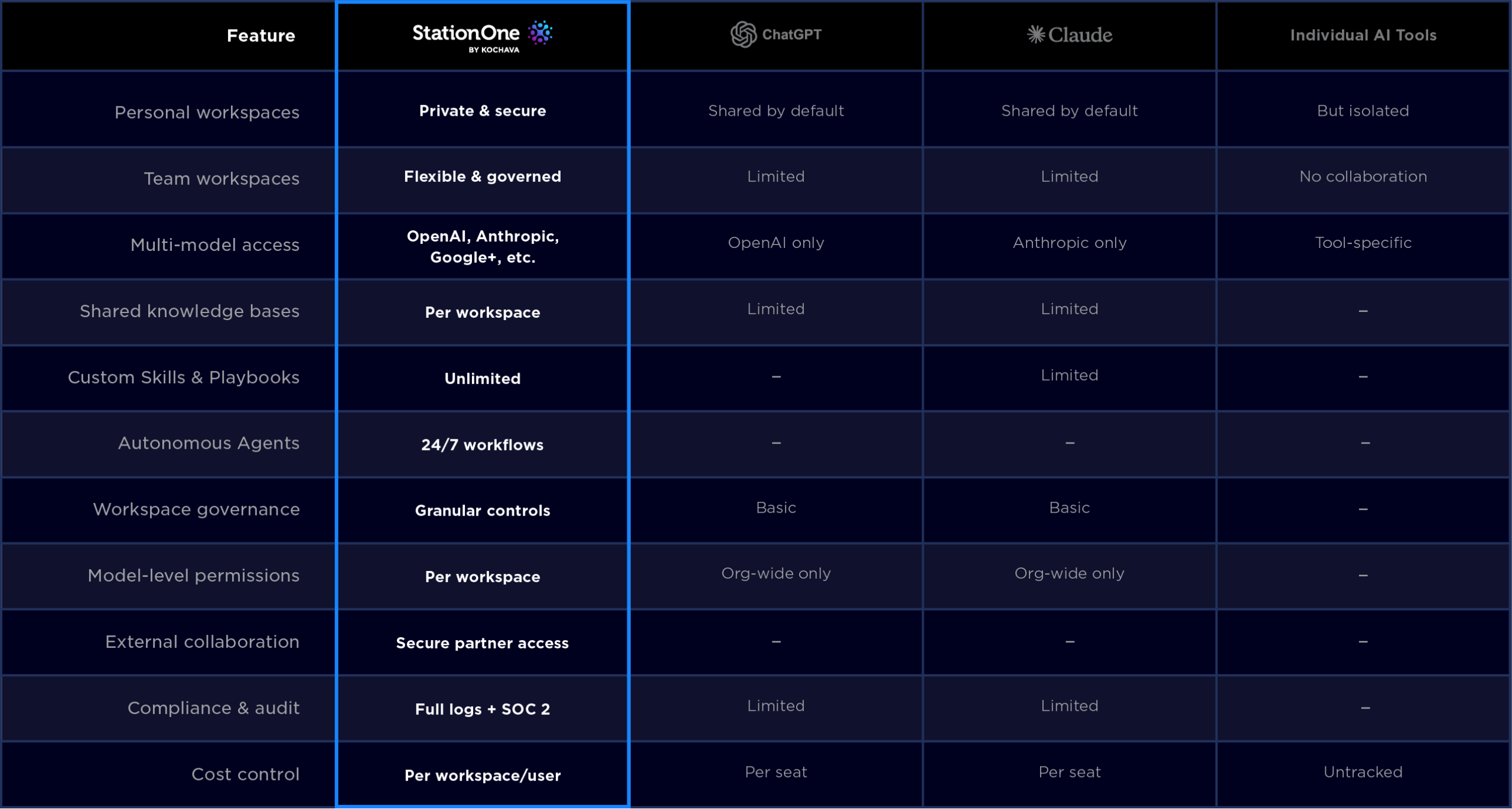
Comparison: StationOne Workspaces vs. Alternatives

StationOne icon

Getting Started with StationOne Workspaces

For Individuals
  1. Sign up: Create your account and get your personal workspace instantly.
  2. Experiment: Try different models, upload files, build your first playbook.
  3. Build skills: Create reusable prompts for your common workflows.
  4. Share (optional): Package your best work and share it to team workspaces.
For Teams
  1. Create a team workspace: Define your team’s scope and invite members.
  2. Upload knowledge: Centralize documents, templates, and institutional knowledge.
  3. Build shared skills: Create reusable AI capabilities for common team tasks.
  4. Deploy agents: Automate recurring workflows (reporting, monitoring, analysis).
For Organizations
  1. Set governance policies: Define model approvals, data residency, compliance rules.
  2. Deploy workspace templates: Roll out preconfigured workspaces for common use cases.
  3. Onboard teams: Train admins and power users, then scale to all employees.
  4. Monitor and optimize: Track adoption, measure ROI, refine policies based on usage.

AI Workspaces FAQ

What’s the difference between Personal Workspace and Team Workspace?

Personal Workspaces are private by default—your work stays yours unless you choose to share. Team Workspaces are collaborative spaces where multiple users work together with shared knowledge, skills, and playbooks.

Can I move work from Personal Workspace to Team Workspace?

Yes! You can package playbooks, skills, or agents you’ve built in your personal workspace and share them to any team workspace you’re part of.

Who controls what I can do in a workspace?

It depends on the workspace type. Within Personal Workspace, you have full control (within your organization’s policies). In Team Workspace, permissions are set by workspace admins. Organization-wide policies (like model approvals) apply to all workspaces.

Can external users (clients, partners) join a workspace?

Yes! You can invite external users to specific workspaces with limited permissions. They can’t access other workspaces or export data without approval.

Can I control which AI models are used in specific workspaces?

Yes! Admins can set model permissions at the organization level or per workspace. For example, you can allow Marketing to use GPT-4 but restrict Finance to approved enterprise models only.

Transform How You Adopt and Scale AI

AI is transforming how work gets done. StationOne Workspaces ensure that it happens securely, collaboratively, and intelligently.

From personal productivity to enterprise-wide AI adoption—all in one platform.

Individuals get private AI environments in which to experiment and build.

Teams get shared intelligence hubs to standardize and scale.

Organizations get visibility, governance, and ROI.

From personal productivity to enterprise-wide AI adoption—all in one platform.

StationOne icon

Ready to Build Your Workspaces?

Start with your personal workspace today. Scale to teams tomorrow.